Last year, we launched Ocean in Google Earth, expanding the scope of Earth to include 3D maps of the world’s oceans and videos, photos and narrative from the world’s leading scientists and media sources to bring them to life. We worked with more than 100 partners to begin to fill in the “blue” part of the planet, adding hundreds of placemarks in more than 20 ocean layers. Since then, we’ve added hundreds of new posts to the Ocean layer with the help of Sylvia Earle’s Mission Blue Foundation and dozens of committed individuals around the world. The posts come from a diverse range of partners including National Geographic, independent videographers and dive enthusiasts, government organizations like the National Oceanographic and Atmospheric Administration (NOAA) and international organizations like the International Union for Conservation of Nature (IUCN).
Today, the layer will become part of the default set of annotations seen by all Earth users. Although a humble step given the dearth of information available about these vast expanses of geography, we are happy to take one more step to make the oceans a first-class part of Google Earth and to give them at least a starter portion of the thick soup of photos and places that describe the land part of the planet. One of the greatest things about Earth is that it allows everyone to see and experience the fullness of their planet, from revisiting places they know well to venturing out to formerly unknown mountain peaks, desert vistas, and increasingly, the blue heart of life on Earth. As Sylvia has said of the Ocean on many occasions, “With knowing comes caring, and with caring there’s hope.”
Soon after last year’s launch, Sylvia asked attendees at the TED conference to help her realize a wish: to create a series of marine protected areas she calls Hope Spots. Sylvia and a group of influential thinkers are now on a Mission Blue Voyage to the Galapagos Islands to brainstorm how they might best achieve better ocean protection. You can follow them on their journey by visiting the the Mission Blue Foundation website and on Twitter at @MissionBlue. There you can learn more about the launch of their Hope Spots initiative and visit all 18 of these spots using the Google Earth plugin.
We’ve also created a narrated tour featured in the Ocean Showcase to introduce you to eight of the regions proposed for protection: the Eastern Pacific Seascape including the Galapagos Islands, the Gulf of California, the Mesoamerican Reef in the Caribbean including Belize, the Sargasso Sea in the mid-Atlantic, the Chagos Archipelago in the Indian Ocean, the Coral Triangle, the Ross Sea in the Antarctic and Gakkel Ridge in the Arctic.
We’d also like to take a moment to thank the partners who have helped us improve our 3D canvas of the world’s oceans in the past year: NOAA (global coverage), MBARI (Monterey Bay Canyon), The California State University at Monterey Bay (California Coast), The Center for Coastal and Ocean Mapping - Joint Hydrographic Center at the University of New Hampshire (Arctic) and The Living Oceans Society (British Columbia and Canada).
As Earth Day approaches, we hope you’ll take a little time to explore the planet, including the blue part.
googlehelpdesk etiketine sahip kayıtlar gösteriliyor. Tüm kayıtları göster
googlehelpdesk etiketine sahip kayıtlar gösteriliyor. Tüm kayıtları göster
8 Nisan 2010 Perşembe

18 Şubat 2010 Perşembe
Introducing Google Buzz
We've blogged before about our thoughts on the social web, steps we've taken to add social features to our products, and efforts like OpenSocial that propose common tools for building social apps. With more and more communication happening online, the social web has exploded as the primary way to share interesting stuff, tell the world what you're up to in real-time and stay more connected to more people. In today's world of status messages, tweets and update streams, it's increasingly tough to sort through it all, much less engage in meaningful conversations.
Our belief is that organising the social information on the web — finding relevance in the noise — has become a large-scale challenge, one that Google's experience in organising information can help solve. We've recently launched innovations like real-time search and social search, and today we're taking another big step with the introduction of a new product, Google Buzz.
Google Buzz is a new way to start conversations about the things you find interesting. It's built right into Gmail, so you don't have to build up an entirely new set of friends from scratch — it just works. If you think about it, there's always been a big social network underlying Gmail. Buzz brings this network to the surface by automatically setting you up to follow the people you email and chat with the most. We focused on building an easy-to-use sharing experience that richly integrates photos, videos and links, and makes it easy to share publicly or privately (so you don't have to use different tools to share with different audiences). Plus, Buzz integrates tightly with your existing Gmail inbox, so you're sure to see the stuff that matters most as it happens in real time.
We're rolling out Buzz to all Gmail accounts over the next few days, so if you don't see it in your account yet, check back soon. We also plan to make Google Buzz available to businesses and schools using Google Apps, with added features for sharing within organisations.
On your phone, Google Buzz is much more than just a small screen version of the desktop experience. Mobile devices add an important component to sharing: location. Posts tagged with geographical information have an extra dimension of context — the answer to the question "where were you when you shared this?" can communicate so much. And when viewed in aggregate, the posts about a particular location can paint an extremely rich picture of that place. Check out the Mobile Blog for more info about all of the ways to use Buzz on your phone, from a new mobile web app to a Buzz layer in Google Maps for mobile.
We've relied on other services' openness in order to build Buzz (you can connect Flickr and Twitter from Buzz in Gmail), and Buzz itself is not designed to be a closed system. Our goal is to make Buzz a fully open and distributed platform for conversations. We're building on a suite of open protocols to create a complete read/write developer API, and we invite developers to join us on Google Code to see what is available today and to learn more about how to participate.
We really hope you enjoy the experiences we've built within Gmail and for mobile phones. If you want to learn more, visit buzz.google.com. We look forward to continuing to evolve and improve Google Buzz based on your feedback.
Our belief is that organising the social information on the web — finding relevance in the noise — has become a large-scale challenge, one that Google's experience in organising information can help solve. We've recently launched innovations like real-time search and social search, and today we're taking another big step with the introduction of a new product, Google Buzz.
Google Buzz is a new way to start conversations about the things you find interesting. It's built right into Gmail, so you don't have to build up an entirely new set of friends from scratch — it just works. If you think about it, there's always been a big social network underlying Gmail. Buzz brings this network to the surface by automatically setting you up to follow the people you email and chat with the most. We focused on building an easy-to-use sharing experience that richly integrates photos, videos and links, and makes it easy to share publicly or privately (so you don't have to use different tools to share with different audiences). Plus, Buzz integrates tightly with your existing Gmail inbox, so you're sure to see the stuff that matters most as it happens in real time.
We're rolling out Buzz to all Gmail accounts over the next few days, so if you don't see it in your account yet, check back soon. We also plan to make Google Buzz available to businesses and schools using Google Apps, with added features for sharing within organisations.
On your phone, Google Buzz is much more than just a small screen version of the desktop experience. Mobile devices add an important component to sharing: location. Posts tagged with geographical information have an extra dimension of context — the answer to the question "where were you when you shared this?" can communicate so much. And when viewed in aggregate, the posts about a particular location can paint an extremely rich picture of that place. Check out the Mobile Blog for more info about all of the ways to use Buzz on your phone, from a new mobile web app to a Buzz layer in Google Maps for mobile.
We've relied on other services' openness in order to build Buzz (you can connect Flickr and Twitter from Buzz in Gmail), and Buzz itself is not designed to be a closed system. Our goal is to make Buzz a fully open and distributed platform for conversations. We're building on a suite of open protocols to create a complete read/write developer API, and we invite developers to join us on Google Code to see what is available today and to learn more about how to participate.
We really hope you enjoy the experiences we've built within Gmail and for mobile phones. If you want to learn more, visit buzz.google.com. We look forward to continuing to evolve and improve Google Buzz based on your feedback.
10 Şubat 2010 Çarşamba
Crawler
A crawler, also known as a spider or a bot, is the software Google uses to process and index the content of webpages. The AdSense crawler visits your site to determine its content in order to provide relevant ads.
Contextual Advertising (Content-Targeted AdWords; Content AdWords)
Google leverages our award-winning search technology to deliver relevant ads to content pages of sites and products in our network (including AdSense web sites). Our technology draws upon our understanding of the billions of pages in our search index and our ability to crawl webpages to figure out which keywords would lead a user to the page. Then, we match ads to the page based on those keywords.
Account creation
An AdSense account will be created for you if your application to the program is accepted. You'll then be able to sign in and activate your account.
What reports can I view?
You'll be able to view reports for a specific day or date range, on an aggregate level or broken down into your defined channels. You'll see the total number of page, ad unit, and ad impressions as well as ad clicks, clickthrough rate (CTR), cost per thousand impressions (effective CPM), and your earnings. Reports are typically updated hourly, with an occasional delay of up to 24 hours.
What is the AdSense Calendar?
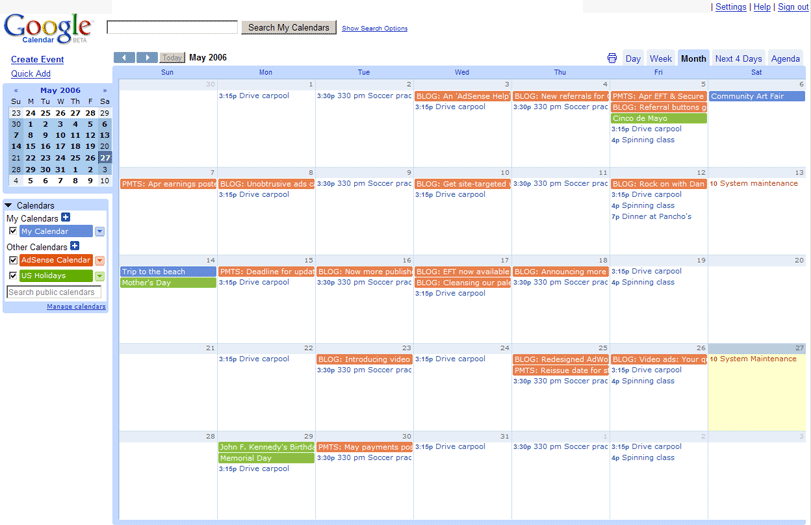
The AdSense Calendar is a Google Calendar which contains our monthly payment schedule, a record of our blog posts, upcoming events, and upcoming system maintenance periods, backdated to the beginning of April 2006. We encourage you to subscribe to the calendar and consult it before contacting us about scheduled events.
This is how the AdSense Calendar would appear within your own Google Calendar (the events in orange are AdSense events).
What is placement targeting?
One of the ways ads are targeted to AdSense publisher websites is through placement targeting. Placement targeting allows AdWords advertisers to choose specific ad placements where they'd like their ads to appear. An ad placement can be an entire website or a specific sub-set of ad units within that site, such as only ad units on sports pages or all ad units at the top of the page.
Advertisers find ad placements in several ways, including by listing websites where they'd like to advertise or by searching for placements that match the themes and topics they'd like to target.
If your site is part of the AdSense network, it should automatically be visible to advertisers as an available ad placement when they search for themes or topics related to the content of your site. You can also define your own ad placements using specific sub-sets of ad units on your site.
Learn more about defining your own ad placements.
Advertisers find ad placements in several ways, including by listing websites where they'd like to advertise or by searching for placements that match the themes and topics they'd like to target.
If your site is part of the AdSense network, it should automatically be visible to advertisers as an available ad placement when they search for themes or topics related to the content of your site. You can also define your own ad placements using specific sub-sets of ad units on your site.
Learn more about defining your own ad placements.
AdSense Webinars schedule
AdSense Webinars schedulePrint
AdSense webinars are free online seminars conducted and moderated by Google AdSense optimization specialists. This series of webinars is designed to help you learn what you can do to maximize your AdSense revenue potential.
After you register for a webinar you will receive a link to a Google Moderator page, where you can ask questions related to the webinar topic and vote on others' questions. We'll answer as many questions as possible during the event.
In advance of each webinar, we encourage you to research the topic using the links provided in the agenda for each.
Technical requirements: To participate, all you need is a computer with an Internet connection and speakers or a pair of headphones. Note to Mac users: Our current version of WebEx Event Center does not support Internet Phone (VOIP) for Mac users. We apologize for any inconvenience caused. Please note, however, that webinar recordings will be posted here the day after each live event.
AdSense webinars are free online seminars conducted and moderated by Google AdSense optimization specialists. This series of webinars is designed to help you learn what you can do to maximize your AdSense revenue potential.
After you register for a webinar you will receive a link to a Google Moderator page, where you can ask questions related to the webinar topic and vote on others' questions. We'll answer as many questions as possible during the event.
In advance of each webinar, we encourage you to research the topic using the links provided in the agenda for each.
Technical requirements: To participate, all you need is a computer with an Internet connection and speakers or a pair of headphones. Note to Mac users: Our current version of WebEx Event Center does not support Internet Phone (VOIP) for Mac users. We apologize for any inconvenience caused. Please note, however, that webinar recordings will be posted here the day after each live event.
How do I get the AdSense code?
The AdSense code is generated from within your publisher account. This is the code that you'll need to add to your pages in order to display Google ads or a search box on your webpages. Please follow the steps below to generate your AdSense code:
1.Log in to your account at https://www.google.com/adsense
2.Visit the AdSense Setup tab
3.Choose your product - AdSense for content to place ads on your site, AdSense for search to add a search box to your site.
4.Follow the guided setup to choose a format and colors. You can also choose any additional options that may apply to
your site, including channels and alternate ads
5.Your code will be generated in the Your ad code window according to your selections.
6.Copy-and-paste the code into the source code of the webpages on which you wish to display Google ads or an AdSense for search box. For tips on adding the code to your page, read How do I add the AdSense code to my site?.
7.If implemented correctly, Google ads or a search box will appear immediately. Initially, the ads that appear may be public service ads, for which you will not receive earnings. Once our crawlers have visited your page, however, targeted ads will begin to appear.
1.Log in to your account at https://www.google.com/adsense
2.Visit the AdSense Setup tab
3.Choose your product - AdSense for content to place ads on your site, AdSense for search to add a search box to your site.
4.Follow the guided setup to choose a format and colors. You can also choose any additional options that may apply to
your site, including channels and alternate ads
5.Your code will be generated in the Your ad code window according to your selections.
6.Copy-and-paste the code into the source code of the webpages on which you wish to display Google ads or an AdSense for search box. For tips on adding the code to your page, read How do I add the AdSense code to my site?.
7.If implemented correctly, Google ads or a search box will appear immediately. Initially, the ads that appear may be public service ads, for which you will not receive earnings. Once our crawlers have visited your page, however, targeted ads will begin to appear.
How do I sign in to my account?
To sign in to your AdSense account, follow these steps:
1.Visit https://www.google.com/adsense
2.In the Existing AdSense Users box, enter the email address and password you supplied during signup.
3.Click Sign in to enter your account.
If this is your first time entering your account, you'll be asked to read and sign the Google AdSense Terms and Conditions. There's important information about the program, so take the time to read through these terms before proceeding.
Once you've read through the document, select the agreement checkbox and click I agree to continue to your account.
1.Visit https://www.google.com/adsense
2.In the Existing AdSense Users box, enter the email address and password you supplied during signup.
3.Click Sign in to enter your account.
If this is your first time entering your account, you'll be asked to read and sign the Google AdSense Terms and Conditions. There's important information about the program, so take the time to read through these terms before proceeding.
Once you've read through the document, select the agreement checkbox and click I agree to continue to your account.
Can I sign up for more than one account?
No. Publishers are not permitted to maintain multiple AdSense accounts under the same payee name.
However, we've provided some guidance below that may help you if you're trying to submit multiple applications. Please identify which common reason best describes your situation, then follow the instructions below.
1) I need to change the login of my existing account
If you have access to your existing AdSense account, please log in and select the My Account tab. Under the Login Information section, please check to see whether the phrase "edit in Google Accounts" appears to the right:
•If the phrase appears, please click the link and update your login in Google Accounts. *Note: Gmail addresses cannot be changed.
•If the phrase does not appear, simply follow these instructions to update your login.
2) I can't access my existing account
•If you've forgotten your login:
1.First, search all of your email inboxes to find the original approval mail we sent you and determine your AdSense login
2.If you still can't find the approval email, please fill out this form to have your approval mail re-sent to your original email address.
•If you've forgotten your password:
1.Visit Google Accounts to have your password re-sent to you.
2.On the page above, if you receive the error message "There are no accounts in our system with the E-mail address ..." then please use this form to reset your password instead.
•If you've forgotten both the login and password for your existing account:
◦Please submit a new application. After we disapprove your new application, we'll work with you by email to help you close the original account and activate the new one. If you choose to follow this path, please be aware that you'll have to replace the ad code on your sites with your new ad code, and that any unpaid earnings of less than $10 will not be issued. Please understand that we take these precautions to protect publisher account security.
•If none of the above login access issues applies to you, then:
◦Make sure you are using both the correct login and the correct password for your AdSense account, rather than your Google Account. Otherwise, you might see an error message reading "Username and password do not match."
◦If all else fails, contact our support team.
3) I need to add more sites to my existing account
•You can use your existing account to do so. Please see our entry on adding more sites.
4) I need a separate account for my business
•In this case, you may submit a new application. Please make sure that the account type (individual or business) and payee name are different from your original application, and ensure that you can accept payments to that payee.
5) I need more reporting channels
•The maximum number of channels we currently offer is 200. Unfortunately, we can't accommodate requests for more channels at this time, though we do hope to increase the number of available channels in the future.
However, we've provided some guidance below that may help you if you're trying to submit multiple applications. Please identify which common reason best describes your situation, then follow the instructions below.
1) I need to change the login of my existing account
If you have access to your existing AdSense account, please log in and select the My Account tab. Under the Login Information section, please check to see whether the phrase "edit in Google Accounts" appears to the right:
•If the phrase appears, please click the link and update your login in Google Accounts. *Note: Gmail addresses cannot be changed.
•If the phrase does not appear, simply follow these instructions to update your login.
2) I can't access my existing account
•If you've forgotten your login:
1.First, search all of your email inboxes to find the original approval mail we sent you and determine your AdSense login
2.If you still can't find the approval email, please fill out this form to have your approval mail re-sent to your original email address.
•If you've forgotten your password:
1.Visit Google Accounts to have your password re-sent to you.
2.On the page above, if you receive the error message "There are no accounts in our system with the E-mail address ..." then please use this form to reset your password instead.
•If you've forgotten both the login and password for your existing account:
◦Please submit a new application. After we disapprove your new application, we'll work with you by email to help you close the original account and activate the new one. If you choose to follow this path, please be aware that you'll have to replace the ad code on your sites with your new ad code, and that any unpaid earnings of less than $10 will not be issued. Please understand that we take these precautions to protect publisher account security.
•If none of the above login access issues applies to you, then:
◦Make sure you are using both the correct login and the correct password for your AdSense account, rather than your Google Account. Otherwise, you might see an error message reading "Username and password do not match."
◦If all else fails, contact our support team.
3) I need to add more sites to my existing account
•You can use your existing account to do so. Please see our entry on adding more sites.
4) I need a separate account for my business
•In this case, you may submit a new application. Please make sure that the account type (individual or business) and payee name are different from your original application, and ensure that you can accept payments to that payee.
5) I need more reporting channels
•The maximum number of channels we currently offer is 200. Unfortunately, we can't accommodate requests for more channels at this time, though we do hope to increase the number of available channels in the future.
How much will I earn through this program?
How much will I earn through this program?Print
The Google ads you are able to display on your content pages can be either cost-per-click (CPC) or cost-per-1000-impressions (CPM) ads, search results pages show exclusively CPC ads. This means that advertisers pay either when users click on ads, or when the advertiser's ad is shown on your site. You'll receive a portion of the amount paid for either activity on your website. Although we don't disclose the exact revenue share, our goal is to enable publishers to make as much or more than they could with other advertising networks.
The best way to find out how much you'll earn is to sign up and start showing ads on your webpages. There's no cost, no obligation, and getting started is quick and easy. Sign up now.
Once you're a part of Google AdSense, you can view your earnings at any time by signing in and viewing your reports. You'll be able to see the total number of page and ad unit impressions, ad clicks, clickthrough rate, effective CPM, and your total earnings so you can get an idea of how well the program is performing for you and how much you can expect to earn over time in the program.
You can also find more information about our payment schedule in our Payments Guide.
The Google ads you are able to display on your content pages can be either cost-per-click (CPC) or cost-per-1000-impressions (CPM) ads, search results pages show exclusively CPC ads. This means that advertisers pay either when users click on ads, or when the advertiser's ad is shown on your site. You'll receive a portion of the amount paid for either activity on your website. Although we don't disclose the exact revenue share, our goal is to enable publishers to make as much or more than they could with other advertising networks.
The best way to find out how much you'll earn is to sign up and start showing ads on your webpages. There's no cost, no obligation, and getting started is quick and easy. Sign up now.
Once you're a part of Google AdSense, you can view your earnings at any time by signing in and viewing your reports. You'll be able to see the total number of page and ad unit impressions, ad clicks, clickthrough rate, effective CPM, and your total earnings so you can get an idea of how well the program is performing for you and how much you can expect to earn over time in the program.
You can also find more information about our payment schedule in our Payments Guide.
introducing-google-buzz
We've blogged before about our thoughts on the social web, steps we've taken to add social features to our products, and efforts like OpenSocial that propose common tools for building social apps. With more and more communication happening online, the social web has exploded as the primary way to share interesting stuff, tell the world what you're up to in real-time and stay more connected to more people. In today's world of status messages, tweets and update streams, it's increasingly tough to sort through it all, much less engage in meaningful conversations.
Our belief is that organizing the social information on the web — finding relevance in the noise — has become a large-scale challenge, one that Google's experience in organizing information can help solve. We've recently launched innovations like real-time search and Social Search, and today we're taking another big step with the introduction of a new product, Google Buzz.
Google Buzz is a new way to start conversations about the things you find interesting. It's built right into Gmail, so you don't have to peck out an entirely new set of friends from scratch — it just works. If you think about it, there's always been a big social network underlying Gmail. Buzz brings this network to the surface by automatically setting you up to follow the people you email and chat with the most. We focused on building an easy-to-use sharing experience that richly integrates photos, videos and links, and makes it easy to share publicly or privately (so you don't have to use different tools to share with different audiences). Plus, Buzz integrates tightly with your existing Gmail inbox, so you're sure to see the stuff that matters most as it happens in real time.
Our belief is that organizing the social information on the web — finding relevance in the noise — has become a large-scale challenge, one that Google's experience in organizing information can help solve. We've recently launched innovations like real-time search and Social Search, and today we're taking another big step with the introduction of a new product, Google Buzz.
Google Buzz is a new way to start conversations about the things you find interesting. It's built right into Gmail, so you don't have to peck out an entirely new set of friends from scratch — it just works. If you think about it, there's always been a big social network underlying Gmail. Buzz brings this network to the surface by automatically setting you up to follow the people you email and chat with the most. We focused on building an easy-to-use sharing experience that richly integrates photos, videos and links, and makes it easy to share publicly or privately (so you don't have to use different tools to share with different audiences). Plus, Buzz integrates tightly with your existing Gmail inbox, so you're sure to see the stuff that matters most as it happens in real time.
